

How it works
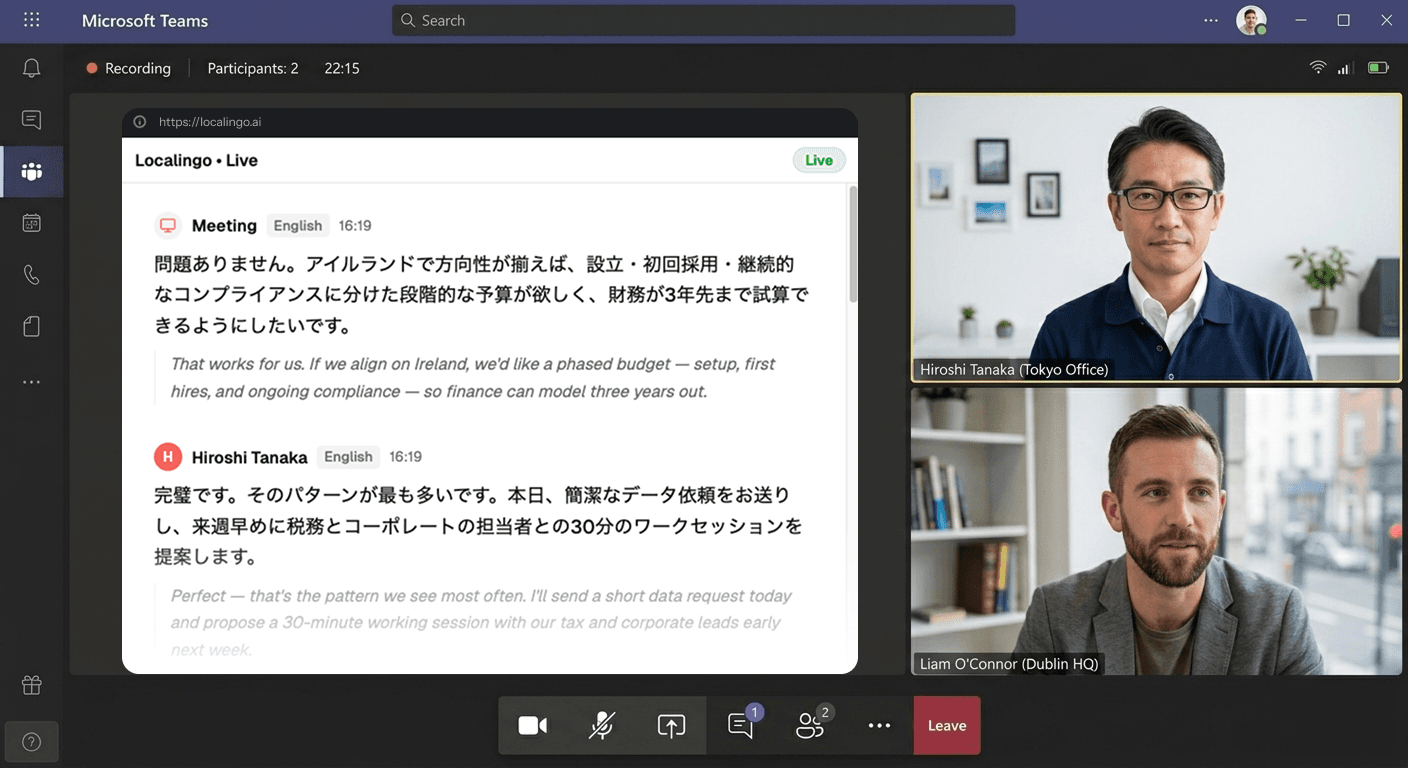
Join your Teams meeting as usual
Nothing changes about how you use Teams. Use the desktop app or browser — Localingo works alongside either.
Allow screen audio when prompted
No installs, no plugins, no bot joining your call. Open Localingo in a browser tab and grant screen audio access when the browser asks — that's all it needs to start translating.
Follow every word, in your language
Live captions appear as people speak, translated into your language in real time. Everything is saved to your meeting history.
What you get alongside every Teams call
Every word translated as it's spoken
Your Teams meeting is transcribed and translated into your language within seconds — across 90+ languages — so you follow every word as it happens, not a delayed summary.
Every meeting saved — transcript and translation, in your language
After the call ends, every Teams meeting is in your dashboard — full transcript, translation, and a searchable record. Teams Copilot produces notes in the meeting's language with no option to translate them. Localingo stores everything in your language, across every platform — ready for AI-powered notes and search.
Your past meetings, saved and searchable.
Today
2Yesterday
2Stays on screen while you use Teams
Picture-in-Picture mode keeps captions and translations visible even when Teams is in the foreground. Switch between windows freely — captions follow you.
Teams' translation: 9 languages, premium licence required.
Limited to 9 languages
Teams' translation supports English, French, German, Italian, Japanese, Korean, Portuguese, Chinese, and Spanish. If your meetings involve languages outside that list, Teams won't cover them. Localingo supports 90+.
Requires Teams Premium and pre-meeting setup
Real-time translation requires a Teams Premium licence — a paid Microsoft add-on most users don't have. On top of that, multilingual mode has to be enabled when scheduling the meeting; you can't turn it on mid-call. Localingo works on any Teams account and is ready the moment you open it.
Copilot summaries come out in the meeting's language — and only cover Teams
Copilot produces notes in the language the meeting was held in — there's no option to get a summary in a different language. And it only works for Teams meetings. Localingo saves a translated record of every call, regardless of which platform it happened on.
Localingo vs Teams Premium translation
| Feature | Localingo | Teams built-in |
|---|---|---|
| Translation without a paid add-on | ✓ | Premium only |
| 90+ languages | ✓ | Premium only |
| Works with any meeting app | ✓ | Teams only |
| Meeting history | ✓ | ✗ |
| AI notes in your language | ✓ | Meeting language only |
| No bot joins the call | ✓ | ✓ |
| Free to start | ✓ | ✓ |
Try it in your next Teams meeting.
Free to start. No credit card, no bot, no setup.
Already have a transcript? Translate it free →